
Abstract
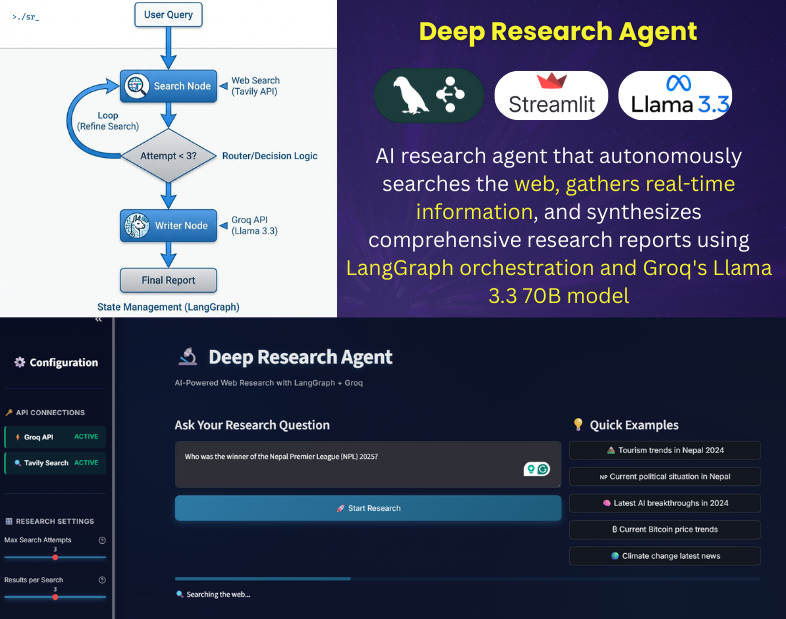
As Large Language Models (LLMs) evolve from simple text generators to reasoning engines, the focus of AI development has shifted toward agentic workflows—systems capable of autonomous planning, tool use, and self-correction. To explore the efficacy of modern orchestration frameworks, I engineered the Deep Research Agent: a fully autonomous system designed to perform iterative, multi-step research tasks.
This project demonstrates a production-ready implementation of a cyclic graph architecture (LangGraph) utilizing the Groq API for high-throughput inference. The resulting system achieves professional-grade research synthesis with a marginal operating cost of $0.005 per query, proving that high-performance autonomous agents can be built cost-effectively using open-weight models.
1. System Overview: The Deep Research Agent
The Deep Research Agent is not merely a wrapper for an LLM; it is a stateful application that mimics the workflow of a human analyst. Unlike zero-shot querying, this system employs an iterative “thought-loop” to refine information quality before generating a final response.
Core Capabilities:
- Iterative Information Retrieval: Automatically executes up to 3 rounds of context-aware web searches.
- Autonomous Quality Assessment: The agent evaluates the relevance of its own search results and autonomously decides whether to halt or continue researching.
- Granular Cost Telemetry: Real-time monitoring of token usage and API expenditures.
- Synthesized Reporting: Production of academic-style reports with citations and structured formatting.
2. Technical Stack & Design Choices
The architecture was chosen to maximize architectural flexibility while minimizing inference latency and operational costs.
- Orchestration: LangGraph (Python) – Chosen for its ability to manage cyclic state transitions, a critical requirement for iterative reasoning loops that linear chains cannot handle efficiently.
- Inference Engine: Groq API (Llama 3.3 70B) – Selected for its superior tokens-per-second (TPS) performance, enabling the “agentic loop” to feel responsive while utilizing open-weight models to reduce costs.
- Information Retrieval: Tavily API – An AI-optimized search engine that returns structured context rather than raw HTML, reducing token context window bloat.
- State Validation: Pydantic – Enforces strict typing for data integrity across agent nodes.
3. Architectural Analysis: Cyclic Graph vs. Linear Chains
A key engineering decision in this project was the implementation of a Cyclic Graph architecture over a traditional Linear Chain.
- The Linear Limitation: In a standard
Input → Search → Outputchain, the model is forced to hallucinate or provide generic answers if the initial search data is poor. - The Cyclic Advantage: By implementing a
Conditionnode, the agent can loop back:Search → Evaluate → (Insufficient Data?) → Refine Query → Search Again. This “human-in-the-loop” logic is automated, allowing the system to self-correct without user intervention.
4. Engineering Implementation & Challenges
The development process highlighted several critical aspects of building production-grade agents.
A. State Management Implementation
Effective state management is the backbone of any agentic system. I implemented a TypedDict structure with reducer operators to maintain context across iterations. This ensures that research findings are accumulated rather than overwritten during loops.
Python
import operator
from typing import Annotated, List, TypedDict

class AgentState(TypedDict):
    # operator.add ensures new search findings are appended to the existing state context
    search_results: Annotated[List[str], operator.add]
B. Resilience and Error Handling
To ensure robustness suitable for automated tasks, I implemented exponential backoff strategies for all external API calls. This prevents cascade failures during momentary latency spikes from search or LLM providers.
Python
for attempt in range(max_retries):
    try:
        return search(query)
    except Exception as e:
        if attempt < max_retries - 1:
            wait_time = 2 ** attempt  # Exponential backoff
            time.sleep(wait_time)
C. Resource Optimization (Cost Analysis)
A primary objective was to demonstrate the economic feasibility of running autonomous agents at scale. By optimizing the system prompt and pruning search results (limiting context window usage), the system achieves a 95% cost reduction compared to proprietary model APIs (e.g., GPT-4).
| Metric | Standard API approach | Deep Research Agent (Optimized) |
| Cost Per Query | ~$0.10 | **~$0.005** |
| Latency | Variable | < 3s (Inference) |
| Architecture | Black Box | Open / Customizable |
5. Conclusion & Future Scope
This project validates that professional-grade AI agents do not require prohibitive budgets or closed ecosystems. By leveraging LangGraph for sophisticated orchestration and Groq for high-speed inference, I have engineered a system that is both autonomous and economically scalable.
Future Research Directions:
- Integration of RAG (Retrieval-Augmented Generation) with vector databases for querying local academic datasets.
- Implementation of Multi-Agent Collaboration, where separate “Researcher” and “Reviewer” agents critique each other’s work to further improve accuracy.
Repository: github.com/kazisalon/Deep-Research-Agent